



A lead fills in your contact form on Tuesday morning. You’re in client meetings all day, so you reply on Thursday. By then, they’ve booked a call with someone who answered first.
An automated sales funnel is a set of tools that moves a stranger from your website to a signed proposal without you doing each step by hand. A form captures their email, emails build trust, a booking link fills your calendar and your proposal software tells you when to follow up. You step in where a person makes the difference: the call, the proposal and the follow-up.
This guide shows how to automate each of the six stages of a service business sales funnel, with the emails to send, the tools to use and the parts to keep personal. We make proposal software and run several email sequences like these for Nusii, so you’ll also see what our customers automate at the proposal stage.
What to automate and what to keep personal
Clients hire people. Automation gets the right people to you faster and handles the admin around each conversation. The conversations themselves, and the judgement in your proposal, stay with you.
-
Step 1: Capture leads
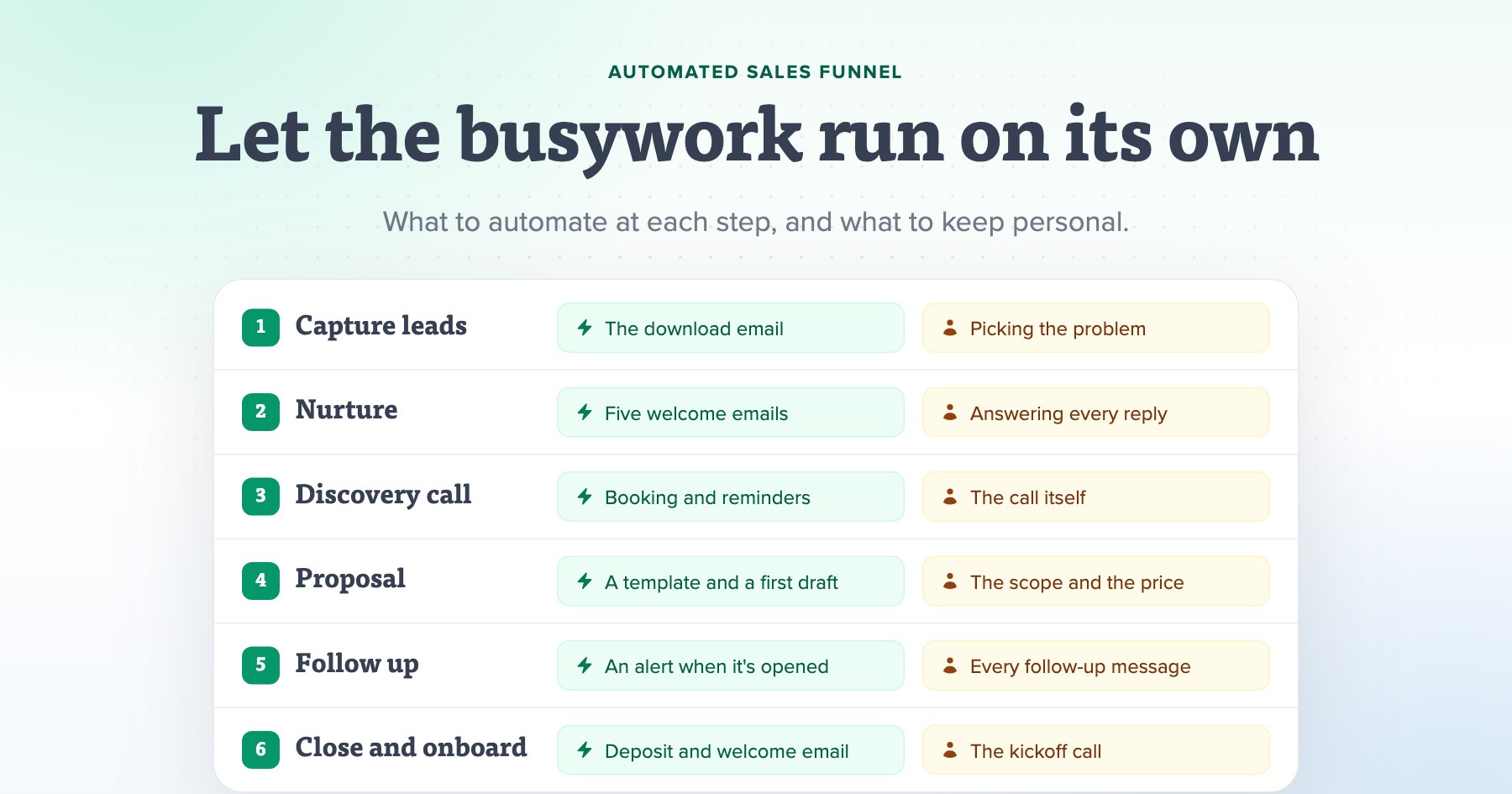
When A visitor asks for your free resourceRuns on its own The download email, a tag for what they asked for and a new contact in your CRMYou do Choosing the one problem your free resource solves
-
Step 2: Nurture
When Someone joins your email listRuns on its own Five welcome emails over two weeks, then a regular email every other weekYou do Writing the emails in your own voice, and answering every reply
-
Step 3: Discovery call
When A lead clicks your booking linkRuns on its own The booking, the intake questions, the calendar invite and two remindersYou do The call itself
-
Step 4: Proposal
When The discovery call endsRuns on its own A template with your standard sections and prices, and a first draft from your call notesYou do The client's problem in their words, the scope and the price
-
Step 5: Follow up
When The client opens your proposalRuns on its own An alert the moment it's opened, and a reminder when it's time to follow upYou do Every follow-up message
-
Step 6: Close and onboard
When The client signsRuns on its own The deposit, the deal marked as won, the welcome email and the new projectYou do The kickoff call
As a rule, automate anything that’s the same for every lead, such as delivering a download, booking a call or sending a reminder. Keep anything that depends on the client in front of you, such as the scope, the price and the answer to their question.
How to create an automated sales funnel in 6 steps
Build the steps in this order. The first two start working as soon as they’re live, while you set up the rest.
Step 1: Capture leads with a form and an instant download
Every automated funnel starts with an email address. Offer one free resource that solves a problem your clients have before they hire you, such as a checklist, a template or a short guide. Put the sign-up form on the pages where it fits. Our sales funnel guide covers what makes a good one.
Then automate what happens after someone signs up:
- Deliver it right away. The email with the download should arrive within a minute, while they’re still thinking about the problem.
- Ask for the email address and one question at most. On our own proposal template downloads, we ask which proposal tool people use, so later emails can fit their situation.
- Tag leads by what they asked for. Someone who downloaded your pricing guide needs different emails from someone who downloaded your onboarding checklist.
- Add them to your CRM, so the lead’s history is in one place before you ever talk.
At Nusii, the link to each template lives only in the email. The form sends the request to our app, and our email tool sends the template within a minute.
Step 2: Write a welcome sequence that runs on its own
Most new leads aren’t ready to hire you yet. A welcome sequence keeps the conversation going for the first two weeks, while they still remember who you are. Five emails are enough, and you can adapt these:
-
Email 1 Right awaySubject: Your [free resource] Hi [first name], Here's the [free resource] you asked for: [link] If you only have five minutes, start with [the most useful part]. It's the part that [why it matters to them]. Over the next two weeks I'll send you four short emails about [your topic]. If a question comes up before then, reply to this one. It comes straight to me. [Your name]
-
Email 2 Day 2Subject: The [topic] mistake I see every week Hi [first name], The most common mistake I see with [topic] is [the mistake]. It costs [type of client] [what it costs them], and it usually happens because [the cause]. To fix it, [one step they can take today]. Are you dealing with this right now? Reply and tell me. I read every answer. [Your name]
-
Email 3 Day 5Subject: How [client] [got the result] Hi [first name], When [client] came to us, [their problem, in one sentence]. We [what you did, in two or three steps]. [How long] later, [the result, with a number]. The whole story is here: [link to the case study] [Your name]
-
Email 4 Day 9Subject: How we work, and who we're not for Hi [first name], Before anyone hires us, I like them to know how we work: 1. [A 30-minute call to understand the problem] 2. [A proposal with two or three options within two days] 3. [The first results within a month] We're not the right fit if [who you don't work with]. Better to know that now than after a call. [Your name]
-
Email 5 Day 14Subject: Want me to look at your [thing]? Hi [first name], If [the problem] is on your list for the next few months, let's talk. On a 30-minute call I'll [what you'll do on the call]. You'll leave with [what they get], whether or not we work together. Pick a time that suits you: [booking link] [Your name]
Write them once, in your own voice, and they’ll work for every lead you get this year. Give each email one job and one link to click. Send them from your own name and address, and answer replies yourself. Someone who replies to a welcome email is often your warmest lead.
After the welcome sequence, move leads to a regular email every other week, with one useful idea or a client story. It keeps you in mind until they’re ready, whether that’s next month or next year. We run several sequences like this at Nusii, from delivering template downloads to helping new accounts get set up.
Step 3: Let leads book their own discovery call
Finding a time by email can take four messages, and every one of them is a chance for the lead to go quiet. Put a booking link in every welcome email, on your services page and in your email signature. A scheduling tool handles the rest:
- Ask two or three questions when they book, including a budget range. You’ll know before the call whether it’s worth having.
- Send reminders the day before and an hour before, so fewer people forget.
- Create the deal in your CRM when they book, so you see their downloads and email clicks before you talk.
- Offer only the slots you want, with a buffer between calls.
Keep the call itself personal. It’s where you hear the client’s problem in their own words, and those words are what your proposal is made of. Our client interview guide has the questions to ask, including how to ask about budget.
Step 4: Send the proposal within 48 hours of the call
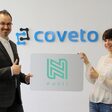
Right after the call, the client is as interested as they’ll ever be. Christian Asche, co-founder of the recruiting software company Coveto, explains why they move fast:
Making proposals faster helps a lot because after the demo with the salesperson, we have to be quick to create the contract and the customer has to be able to see it immediately, because if we take too long, people start thinking: “do I need it really?” If they start to doubt, the lead gets colder.
 Christian Asche, Co-founder & CEO at Coveto
Software can’t write your proposal for you, but it can take care of most of the work around it:
- Start from a template. Keep one per service, with your standard sections, terms and prices already in it, and write only the parts about this client. Kevin Griffin of Griffin Consulting told us that since switching to Nusii, “75% of my proposals are done within 5 minutes of creating a new one.”
- Reuse sections. Your process, case studies and terms rarely change. Save them once and add them in a click.
- Offer options. Two or three packages, or optional extras whose prices add up as the client picks them, let the client choose how to work with you.
- Connect your CRM. With the HubSpot integration, the deal moves to the next stage when you send the proposal and again when the client accepts. The signed PDF is saved to the deal.
Across a year of proposals sent through Nusii, agencies and consultants won around four in ten. A fast, specific proposal is how you end up on the right side of that number. Our guide to proposal automation goes deeper into this step.
Sending proposals through Nusii saved us an average of 2 hours per proposal, and increased closed/won deal conversion rate by 41%.
 Rebecca Shaddix, Managing Partner at Strategica Partners
Let AI write the first draft
AI helps most at this step, as long as it drafts and you decide. With Nusii’s connector for Claude, you can paste your call notes into Claude and ask for a proposal from one of your templates. Claude creates the draft in Nusii with your own sections and prices, and you review it and send it from Nusii. It never sends anything itself. The same connection works with ChatGPT, Gemini and Microsoft Copilot.
Read every line before it goes out. The client’s problem, the scope and the price are the parts that win the work, and they should sound like someone who was on the call.
Step 5: Get an alert when it’s opened, then follow up yourself
Clients look at a proposal almost straight away, and take longer to sign it. In a year of proposals sent through Nusii, the median time from sending to the client’s first look was 48 minutes, and three in four were opened within a day. Half of the accepted proposals were signed within three days, yet a third were signed more than a week after they were sent. A proposal that’s been quiet for a week isn’t lost, so keep following up for at least two weeks.
- is the median time from sending to the client's first look
- 48 min
- proposals are opened within 24 hours of sending
- 3 in 4
- is how soon half of the accepted proposals are signed
- 3 days
- 1 day 38%
- 3 days 50%
- 1 week 65%
- 2 weeks 77%
- 30 days 88%
Let software remember the follow-ups for you, and write the messages yourself.
- Get an alert when the client opens it. Nusii emails you the moment a client opens your proposal, and the Slack integration can post it to a channel. Call while it’s fresh, ideally the same day. Our guide to proposal tracking explains what else to watch.
- Set follow-up reminders. On Nusii’s Agency plan and up, you set a reminder interval for each proposal, so a follow-up doesn’t slip on a busy week.
- Write the follow-up yourself. Nusii reminds you but never emails your client on its own. A good follow-up answers the client’s question or brings something new, and only you know what that is.
Three follow-ups cover most situations:
-
Follow-up 1 A day or two after they open itSubject: Any questions about the proposal? Hi [first name], I wanted to make sure the proposal for [project] reached you, and to answer any questions before you decide. Would 15 minutes on [day] help? I can walk you through the options. [Your name]
-
Follow-up 2 About a week after you sent itSubject: One more idea for [project] Hi [first name], On our call you asked about [their question]. Here's [the answer, an example or a short resource]. The proposal is here whenever you're ready: [link] [Your name]
-
Follow-up 3 About two weeks after you sent itSubject: Is [project] still a priority? Hi [first name], I haven't heard back about [project], so I'm guessing the timing has changed. If it's still on your list, I'm happy to adjust the scope or the start date. If not, just let me know and I'll check in again in [month]. [Your name]
If price is what’s holding them back, our guide to proposal objections has replies that keep the deal alive.
Step 6: Take the deposit and start onboarding automatically
Signing should be the easiest part of the funnel. Let the client accept, sign and pay in one place, then let the paperwork run itself.
- Sign online. Every step between yes and signed, such as printing and scanning a PDF, gives the client a reason to wait.
- Take the deposit at signing. With Stripe connected, the client can pay right after they accept the proposal. Asking for money up front doesn’t seem to put clients off. Among Nusii accounts with Stripe connected, 61% of the proposals that asked for a deposit or payment were accepted, against 43% of those that didn’t, and two in three of those accepted were paid in Nusii. It’s a small group of 119 proposals, and clients ready to pay may simply be further along, but it’s a good sign.
- Start onboarding when they accept. Nusii can send a webhook or start a Zapier or Make automation the moment a proposal is accepted. Use it to send your welcome email, create the project in your project tool, draft the invoice and mark the deal as won.
- Schedule the referral request. Set a reminder for the end of the project to ask for a review and an introduction. Referrals bring new leads straight into step 1.
Plenty of our customers already work this way:
- Nusii accounts connect Stripe, so clients can pay a deposit inside the proposal
- 1 in 5
- Nusii accounts connect another tool, such as Stripe, HubSpot or Slack
- 1 in 4
Back then, I was sending sponsorship proposals that I created in Canva. And while my conversion rate wasn’t bad, it certainly wasn’t near as good as what Nusii did for me. The integrated payment processing with Stripe means I don’t have to chase after my sponsors for their money.
 Dale L. Roberts, Author & Video Creator at Self-Publishing with Dale
Example: an automated sales funnel for a two-person consultancy
Here’s how the six steps fit together for a two-person IT consultancy that works with small law firms. Green marks what runs on its own. Yellow is the consultants’ own time.
-
Day 0
Runs on its own A managing partner downloads “The 15-minute security check for small law firms” from a LinkedIn post. The checklist reaches her inbox within a minute, and she lands in the CRM as a new lead.
-
Day 2
Runs on its own Welcome email 2 arrives, about the most common security mistake in small law firms.
-
Day 5
Runs on its own Welcome email 3 tells the story of a 12-person firm the consultancy helped.
-
Day 6
Runs on its own She clicks the booking link and picks a time. Her answers to three questions, budget included, go into the CRM. Reminders go out the day before and an hour before.
-
Day 8
You The 30-minute discovery call.
-
Day 9
You The consultant turns the call notes into a proposal from their template, starting from an AI draft, checks every line and sends it.
-
Day 10
Runs on its own She opens the proposal, and a message lands in the consultancy's Slack.
-
Day 10
You The consultant calls that afternoon and answers her two questions.
-
Day 12
Runs on its own She signs and pays a 50% deposit. The deal moves to won in the CRM, a welcome email goes out and the project appears in their project tool.
-
Day 15
You The kickoff call.
Over two weeks, the consultants spent a few hours on this lead: the call, the proposal and one phone call to answer questions. Everything else ran without them.
The tools you need
You don’t need an all-in-one platform. Most service businesses run their funnel on five or six tools, connected by an automation tool:
| Tool | Its job in the funnel | Examples |
|---|---|---|
| Email marketing | Sign-up forms, the welcome sequence and the regular email | Kit, MailerLite, Mailchimp |
| Scheduling | Self-booked calls, intake questions and reminders | Calendly, Cal.com, SavvyCal |
| CRM | One record per lead, from the first download to the signed deal | HubSpot, Pipedrive |
| Proposal software | Templates, online signing, deposits and an alert when a proposal is opened | Nusii |
| Payments | Deposits at signing | Stripe |
| Automation | Connects the rest, so something happening in one tool sets off an action in another | Zapier, Make |
Most of these have a free plan to start, so you can build the whole funnel before you pay for much. All-in-one platforms such as HubSpot cover several rows at once at a higher price. They make sense once several people on your team are selling.
What not to automate
- Replies to a real question. An automatic “Thanks, we’ll get back to you today” is fine. A canned answer to a specific question tells the lead nobody read it.
- The discovery call. A booking form can filter out bad fits, but the call is where a client decides whether they trust you.
- The content of your proposal. Templates and AI give you a strong first draft. The client’s problem, your scope and your price need your judgement.
- Follow-ups. Let software remind you, and write each one for the client and the proposal in front of you.
- Fake urgency. Countdown timers and invented deadlines don’t suit a service someone pays thousands for. Give them a real reason to decide, such as your next available start date.